
Creating and Accessing Your DK88 Account: A Step-by-Step Walkthrough
Everything on our platform, from claiming a bonus to placing a live bet, starts with one DK88 account. This guide covers the two moments that matter most before you ever reach the lobby: opening an account for the first time, and signing back into it every session after. We've kept both processes short on purpose, so the steps below match exactly what you'll see on screen — no extra jargon, no hidden stages, and no separate page to hunt through for either one.
How to Register
Opening an account takes one form and a couple of minutes. We ask only for the details needed to get you playing and, later, withdrawing — nothing about your country or preferred currency, since our platform is built specifically for the Malaysian market from the ground up rather than adapted from a generic global template.
DK88 Registration Steps
- Find the Sign Up button, placed prominently in our top navigation.
- Pick your route: the standard form, or the faster "Sign up with Google" option.
- On the standard form, fill in a username, a password, your phone number and an email address.
- Add a promo code if you have one; this step is optional and can be skipped entirely.
- Tick the box confirming you're 18 or older and agree to our Terms and Conditions.
- Submit the form — your account is active immediately, no separate confirmation email required before you start browsing.
What the Form Asks For
Each field on our DK88 sign-up form does one job, and knowing what's expected in advance means you won't get bounced back to fix something after submitting:
- Username — the identity you'll use across the platform going forward, so pick something you're happy to keep.
- Password — a minimum of 6 characters; going longer is a smart habit even though 6 clears the bar on our form.
- Phone number — the field is pre-set to the +60 Malaysia prefix, so you only type the local digits that follow.
- Email address — your main contact channel with us, and one of the two details used later to confirm your identity.
- Promo code — optional, and leaving it blank changes nothing about the rest of your sign-up.
- Age and terms checkbox — required before the Sign Up button will submit anything at all.
Because we serve a single market rather than a broad international one, there's no country dropdown or currency toggle slowing the form down — just the fields above, validated instantly if something's off, so a short password or an incomplete phone number is flagged before you submit rather than after.
Signing Up with Google
Prefer to skip typing a password altogether? The "Sign up with Google" button sits right beside the standard form and links your existing Google account to a new profile in a couple of clicks. You'll still confirm your age and accept our Terms, but the username-and-password step disappears entirely — your Google login effectively becomes your Dash King 88 Casino credential going forward, on both the site and the app.
Completing Your Profile Before You Withdraw
DK88 registration gets you playing right away, with no wait for a confirmation link, but there's one more step waiting before your first withdrawal: a short profile-completion form. It appears automatically the first time you request a payout with any details still missing, framed as a last small step rather than a hard block, and it asks for two things — confirming your phone number or email, then filling in the personal data below:
- Legal first name
- Legal last name
- Date of birth
- Country — this generally arrives pre-set to Malaysia, matching the +60 phone format used at registration
- City
- A secret question and its answer, used for account recovery
This isn't a document upload or a scan of your ID — it's closer to finishing a profile than clearing a compliance hurdle. Our terms do reserve the right to request further documentation later where needed, including proof of identity or a video-call check, but at this stage it's a form to complete, not a file to upload.
One Account Per Player
DK88 runs a strict one-account policy, set out under our Terms & Conditions §3.7. Each player gets a single account, and where we identify multiple accounts belonging to the same person — including one opened with someone else's personal details, coordinated groups acting together, or accounts tied to fraudulent transactions or chargebacks — we reserve the right to void the wagering contract attached to them. Sticking to one account, registered with your own accurate details, is the simplest way to keep your welcome bonus and VIP progress protected under this rule. Separately, we also reserve the right to close an account at our own discretion at any time, returning any remaining balance less applicable withdrawal fees.
How to Log In
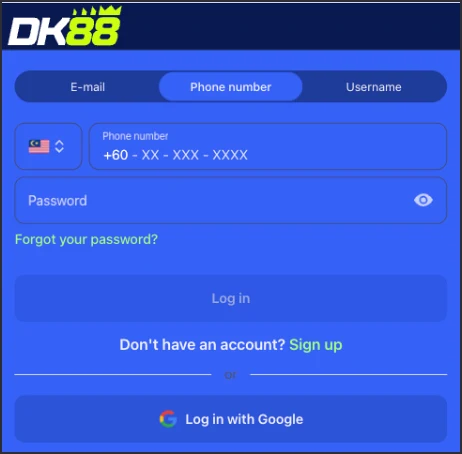
Once your DK88 account exists, getting back in takes seconds. The login form reuses exactly the credentials you set at sign-up, so there's nothing new to remember — just the username and password, or Google account, you chose the first time around, whether you're returning through the website or the DK88 mobile app.
DK88 Login Steps
- Open the login form from the site header.
- Enter your registered username and password.
- Hit submit.
- You land straight in your dashboard, with your balance, bet history and active promotions all visible.
Two Ways to Sign In
Which login method applies to you at DK88 depends entirely on how you registered in the first place:
- Username and password — the route for anyone who filled in the standard DK88 sign-up form.
- Google login — for accounts created through "Sign up with Google," where your linked Google credentials do the work instead of a separately typed password.
Either path lands you in the same place: one dashboard, with betting, deposits and every promotion available regardless of which door you came through to get there.
If You Can't Remember Your DK88 Password
We haven't published a self-service password reset anywhere on our site, so if access slips your mind, the fastest fix is reaching out to our support team directly rather than hunting for a "forgot password" link that isn't there. Our team can help confirm your account details and get you back in without much delay. If you signed up through Google, this isn't relevant to you at all — recovering access just means regaining access to that linked Google account, since no separate password exists for logins created that way.
Keeping Your DK88 Access Smooth
A couple of habits make future logins painless. Keep the phone number and email tied to your account current, since these are the two details we lean on most when helping verify who you are during a support request. And remember that a successful login only checks your username and password — it doesn't automatically complete the profile step required for withdrawals, so that piece still needs handling separately the first time you try to cash out from Dash King 88 Casino.
DK88 Account FAQ
Do I need to pick a country or currency when I sign up?
No. DK88 registration is built around one market, so there's no selector for either — the phone field is fixed to +60 and everything displays in RM.
Is the promo code field required at DK88?
No, it's optional. Skipping it doesn't affect the rest of your sign-up in any way.
Can I use the same login for the app and the website?
Yes. Your registered credentials, or your linked Google account, work the same way whether you're signing in through a browser or our mobile app.
What happens if I open more than one account?
Multiple accounts tied to one person, including those opened with someone else's details, can trigger a void of your wagering contract under DK88 Terms & Conditions §3.7 — stick to a single DK88 account to avoid this.
Do I need to complete my profile before I can deposit?
No. The profile-completion step only gates withdrawals — you can deposit and play right after registering.